AhaDiff User Guide
Learn from your own fixes, a colleague's edits, AI-generated changes, or one Markdown document. Choose a source, preview it, then read the lesson beside its evidence and practice with quizzes and review. Your working folder keeps the learning history under .ahadiff/. File, patch, snapshot, and document learning work without Git.
1. Quick Start
Install AhaDiff, open the local WebUI in your working folder, and add a provider. Start with two file versions, a saved baseline, or one Markdown document; none needs a Git repository or AI tool integration.
Install
Install the CLI and bundled WebUI with pipx or uv tool. Neither needs a source checkout. Inside a virtual environment or conda environment, python -m pip install ahadiff also works. If pip reports externally-managed-environment, choose an isolated installer.
Update an existing installation
Stop the AhaDiff server, back up the working folder's .ahadiff/, and update with the same installer. Restart ahadiff serve afterward. Keep the backup private: it can contain source excerpts and keys.
For pip inside a virtual environment: python -m pip install --upgrade ahadiff.
Open your working folder
Open a terminal in the folder where you want to keep your learning history. An ordinary folder works; a Git repository is optional for file, patch, snapshot, and document input. The following command works in macOS/Linux terminals and Windows PowerShell:
AhaDiff opens http://127.0.0.1:8765 and creates local state as needed. In Settings, add a local or remote provider. Remote generation requires an explicit remote privacy mode. Provider setup may send a small probe; previewing file changes does not call an LLM.
Choose what you want to learn from
Git changes
Study a bug fix, a colleague's commit, or AI edits in an existing repository. Select the working tree or a commit range.
Two files
Select or drop the before and after files into their respective fields. Use code, SQL, configuration, Markdown, or two .ipynb versions. Matching filenames are fine.
Paste a diff
Paste a unified diff copied from a review or another tool. This input expects changed lines and diff headers, not a single document or a review comment.
Saved snapshot
Select a file before editing, name it, and explicitly save a local baseline. Reopen the list later, choose that baseline, and select the later file to compare. It is a filtered learning reference, not a full backup.
One Markdown document
Select one .md or .markdown file. Preview its text and study section/paragraph citations without creating a fake before/after diff.
The same run links these pages together. Save a snapshot explicitly before editing, or choose one Markdown document for a document lesson. Snapshots require an explicit save. PDF ingestion and web-page capture are not available. AI tool integration is optional.
Optional CLI setup inside an existing Git repository
Only use these commands inside a Git repository. Ordinary folders start with ahadiff serve; the CLI init and doctor commands still require Git repository metadata.
Run artifacts and review state stay in the selected workspace. Provider configuration can stay workspace-local or global.
The storage gate accepts these SQLite builds
Use Python 3.11+ with an accepted SQLite runtime. The SQLite version comes from the Python build used by AhaDiff, not from the installer name.
Check the diagnostics in Quick Start before your first lesson. Inside a Git repository, you can also run ahadiff doctor to confirm your SQLite build clears the gate; it reports the detected version and the required threshold, and fails closed when the build is too old. A higher version number is not automatically accepted. The gate requires SQLite 3.51.3 or newer, or a backported 3.50.4+ / 3.44.6+ build, so 3.51.0-3.51.2 fall below the bar and are not accepted. If the diagnostics flag your build, choose a Python build with a compatible SQLite runtime and recheck it. An installer name or a Windows Python version alone does not establish SQLite compatibility.
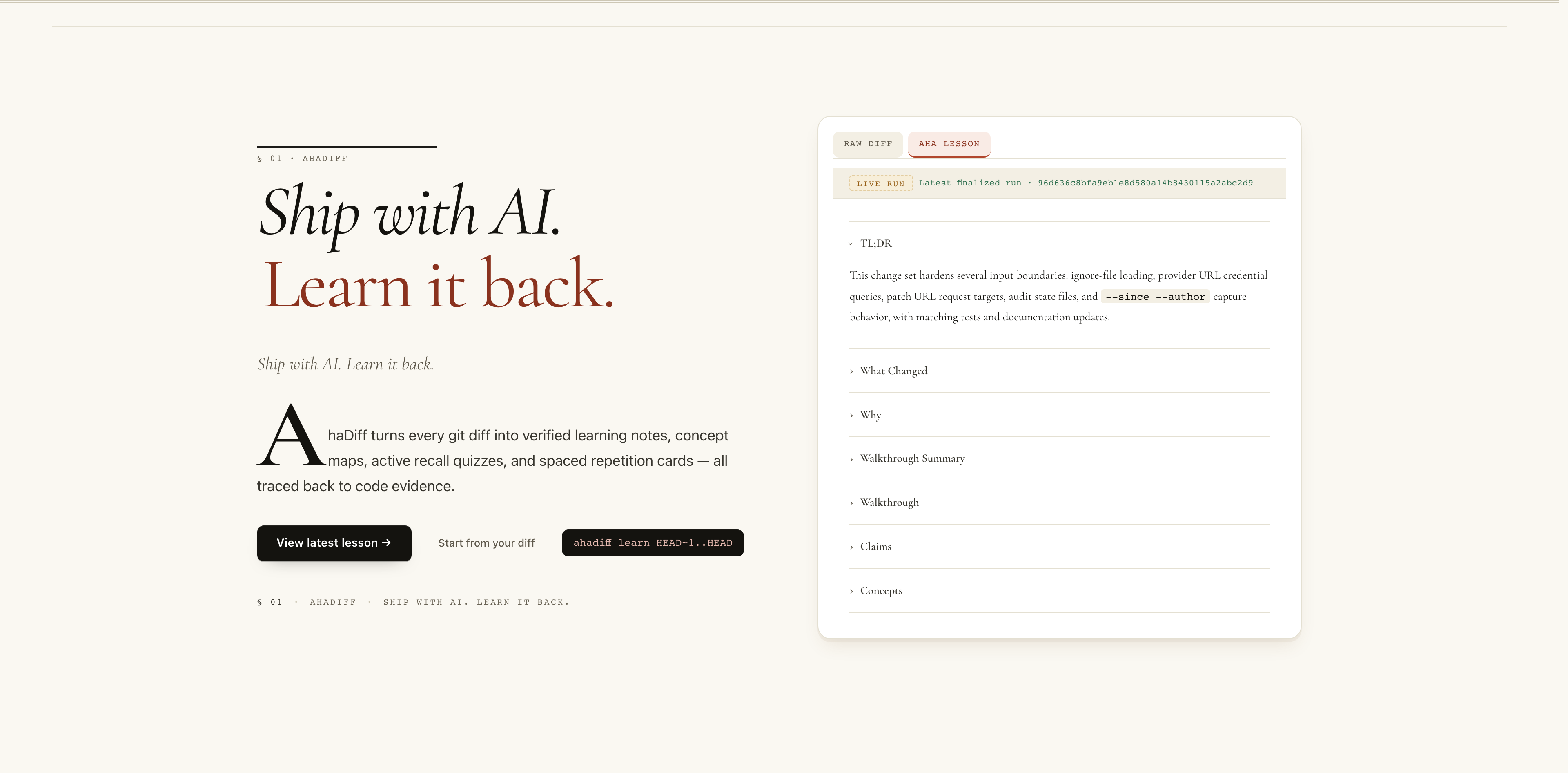
- Serif hero headline: Ship with AI. Learn it back.
- Drop-cap intro paragraph describing AhaDiff.
- Latest-lesson and first-run entry points.
- Right card previews the latest finalized run's lesson outline.
2. Configure a Provider
Open Settings and add a local or remote provider. Choose the API protocol, base URL, and a model your account or local server can use. Select the generation provider and model; the optional judge can use a different pair. A saved configuration is not proof of a working connection, so check the test result before starting a lesson.
A model-limit preview reads local configuration and registry data without contacting the provider. Testing a provider sends a small real request and may incur a charge. Remote generation requires redacted_remote or explicit_remote; the default is strict_local.
Configure from the terminal
The examples below test a provider and save its configuration after a successful probe. Replace the base URL and model placeholders with values from your service. --api-key-env takes an environment-variable name. Keep the key in that variable for later CLI calls, or save it through Settings.
For OpenAI Chat Completions. macOS/Linux shell example:
For an OpenAI-compatible gateway, use --provider-class openai_compat unless the service documents a more specific supported protocol.
For a Responses endpoint. This macOS/Linux command reads the key without echoing it:
Windows PowerShell:
Use openai_compat for the official DeepSeek API. The example uses JSON object output mode.
Start LM Studio's local server and load a model first. Replace the model ID below; change the URL if you use a different port. A local server without authentication does not need a key.
For Ollama, use --provider-class ollama --base-url http://127.0.0.1:11434 and a model you have pulled.
Model limits and thinking
- Model default leaves thinking behavior to the provider. Off requests disabled thinking only on supported models and endpoints. Other models may offer effort levels, an on/off toggle, or no thinking control.
- Leave the output limit empty for Auto. AhaDiff warns when it reduces a value to a known maximum. Unknown or deployment-specific limits stay estimates; a cloud limit does not establish your local server's capacity.
- Generation and judge limits resolve separately. Select a limits profile only when it matches the endpoint you use. If you change models, review any explicit thinking setting before saving.
- Keep shared providers in global configuration if you use several workspaces. A workspace provider with the same alias takes precedence. A model listing confirms its name, not your account's inference access.
Where the key is stored
Paste the key itself into the API Key field in Settings. AhaDiff writes it to the selected scope’s .env and stores only a reference in config.toml. Workspace providers use .ahadiff/.env; global providers use the directory below. Back up global configuration separately from your learning history. Workspace ignore rules keep the key file out of an ordinary git add. Keep key files out of shared archives. A system environment variable with the same name takes precedence.
| Platform | Global key file |
|---|---|
| macOS | ~/Library/Application Support/ahadiff/.env |
| Linux | ${XDG_CONFIG_HOME:-~/.config}/ahadiff/.env |
| Windows | %APPDATA%/ahadiff/.env |
Leave an existing provider's key field blank to retain its key. Saving a new key can test the connection, but a failed test does not undo the saved configuration; inspect the result. Removing a provider cleans up unreferenced keys using the reserved AHADIFF_ prefix. Do not use that prefix for unrelated entries in the local key file.
On macOS/Linux the key file uses owner-only permissions. On Windows, protect the folder with NTFS permissions. For OS-managed credentials, set api_key_env to an environment variable instead of pasting a key.
Advanced: a gateway's JSON capability differs from the default
Use boolean capability overrides only after confirming what your endpoint accepts. For example, NewAPI defaults to JSON object mode. If your gateway supports native JSON schema, enable it under that provider alias:
3. Run a Learn Session
Pick a learning source
Use the five shared sources in the WebUI. Put earlier and later versions on their respective sides, or select a standalone Markdown document.
Preview, then start learning
Preview the actual diff or document text after safety processing. Editing the source invalidates that preview, so preview again before starting. Generation uses your configured provider and privacy settings, then produces claims, lesson, quiz, and score artifacts.
Open the WebUI to learn
Read the Lesson for the explanation, jump to Diff for the evidence, take the Quiz to check understanding, and use Review for spaced repetition.
Prefer the terminal? These CLI modes use the same learning pipeline. File and patch paths must stay inside your workspace; Git modes require a repository. Use --force-learn when you want to study a small exercise.
ahadiff learn --lastgit add first.ahadiff learn --stagedahadiff learn --unstaged --include-untrackedahadiff learn --since "2 hours ago"ahadiff learn HEAD~1..HEADahadiff learn --patch change.diffahadiff learn --patch -ahadiff learn --patch-url URLahadiff learn --compare old.py new.pyahadiff learn --compare-dir old/ new/--against-spec SPEC.md to any of these to check the diff against a spec; add --spec-semantic-review for the semantic pass.--since alone vs --since --author
--since
--since --author
Patch and URL captures carry caveats:
File input, preview, and evidence limits
The browser accepts UTF-8 text files up to 256 KiB each and 512 KiB for a pair. Snapshot files and single Markdown documents keep the 256 KiB limit in both CLI and WebUI. Selecting files keeps drafts in page memory and does not edit the originals. Two .ipynb files retain cell-aware source comparison; AhaDiff does not run their cells. Markdown and structured formats add dedicated anchors where parsing succeeds; SQL and unsupported structures retain explicit line evidence. Weak or unproven states remain when stronger support is unavailable.
Preview changes sends input to the local service, without an LLM call. It displays at most 64 KiB and marks partial display. Display truncation is separate from a capture-limit warning: only the latter means the captured input itself is incomplete. After Start learning, generation follows your chosen local/remote privacy mode and stores the normal run artifacts in .ahadiff/.
Pasted unified diffs have a 64 KiB input limit. Serialized browser requests have a 1 MiB limit, so heavily escaped text can reach the request cap before the file caps. Use the CLI for larger comparison inputs; snapshot and document limits remain fixed. CLI patch and comparison files resolve inside the workspace root; pass --patch - for an externally generated patch.
Save and reuse a local baseline
- Open Saved snapshot, choose the file before editing, and enter a portable name of at most 80 characters.
- Select Save baseline locally. The list shows the saved time, size, and readiness; filtering may change the saved content.
- On a later visit, select Use baseline and choose the file after editing. Preview the comparison, then start learning.
- To remove a baseline, select Delete snapshot and confirm the named item. Existing runs and source files remain intact.
Copy SNAPSHOT_ID and content_hash from the list. The optional learn hash binds the exact comparison content. Deletion instead requires the record's record_hash and an interactive confirmation:
--yes skips only the interactive prompt for that exact ID/hash. The WebUI always presents a specific deletion confirmation. Corrupt or unsupported records stay unavailable for comparison; records that cannot be safely read have no deletion hash.
.ahadiff/snapshots/. Each input file is at most 256 KiB. Only filtered, UTF-8/NFC/LF-normalized learning text is saved. A snapshot is not a complete original-file backup. No automatic watching, chat capture, or source overwrite is performed.Learn from one Markdown document
Choose One Markdown document, select a single UTF-8 .md or .markdown file of at most 256 KiB, preview its original text after filtering, and start learning.
The independent document source stores document.md and section/paragraph anchors. The evidence page displays original lines without add/delete markers; Lesson, Quiz, and Review keep their normal run links. This mode has no diff-spec alignment. Diff Coverage and change-novelty Learnability are N/A / 0/0 and excluded from its overall score; A required coverage check looks for evidence in the document’s body text. If the document contains only headings, the check uses those headings instead. Quoting headings alone does not cover a document that has body text. This mode accepts one local Markdown file; it does not accept PDFs, URLs, or document collections.
Add human review notes
After choosing a change source, optionally fill in Review notes. CLI users can select a local text file:
Notes are limited to 8 KiB of UTF-8 text, filtered as untrusted input, and labeled as auxiliary context. They do not produce evidence locations or replace counterevidence. The run records their use and content hash. Draft text stays out of task retry summaries; editing it invalidates the earlier preview. Do not include credentials.
Read format-specific evidence
| Input | Locator | What to inspect |
|---|---|---|
| Markdown | Heading path and paragraph | Quoted text, line range, and content hash |
| Notebook | Cell source / cell identity | Source cells only; output does not establish execution evidence |
| JSON / TOML / YAML | Key path | The source value and its old/new side; intended effect is semantic |
| Unsupported or ambiguous structure | Explicit line fallback | Weaker evidence; no invented structural certainty |
The dedicated format index is limited to 4,096 anchors. A large diff can show a partial-index warning while its existing hunk evidence remains usable. A standalone document above this structural limit is rejected, so a partial document is not presented as a complete evidence basis.
Open a claim's source anchor to see its side, location, quote, and hash. Moving or renaming different content does not preserve its evidence identity. Existing runs with only hunk evidence remain readable. A declared new source artifact that is missing, corrupted, or inconsistent is rejected rather than treated as verified text.
Long-running commands show progress in the terminal. Wait for the final run ID before opening the result.
4. Use the WebUI
Run one of these to open the local React SPA. serve opens a browser by default; add --no-browser to keep it headless, or --watch to auto-learn when files change in a Git working tree.
Workflow at a glance
Page map
| Page | What it's for |
|---|---|
/welcome | Choose Git changes, Two files, Paste a diff, Saved snapshot, or One Markdown document; open your latest lesson. |
/onboarding | Open a working folder, configure a provider, check diagnostics, and start your first lesson. Agent setup is optional. |
/ | Dashboard: latest runs, KPIs, ratchet trends, and review activity. |
/run/:runId | Run detail: Overview, Score, Judge, Artifacts. If the optional LLM judge fails, the Judge tab shows a redacted failure panel instead of raw provider output. |
/run/:runId/lesson | Lesson body, claim summary, evidence, and knowledge notes. |
/run/:runId/diff | Unified/Split diff, claim dots, and the ClaimInspector. |
/run/:runId/quiz | Guided / Recall / Transfer questions. The mode badge says whether the current question is a one-time Socratic quiz or an SRS review card. |
/review | FSRS review queue with Again / Hard / Good / Easy grading. |
/concepts | Concept ledger, concept graph, and Graphify source. |
/ratchet | Result history, benchmark summary, improve preview, and export entry points. |
/settings | Providers, capture, privacy, audit, preferences, and project-level AI tool guidance. AI Tool Guidance groups targets as CLI / IDE / CI, shows usage hints, and includes a provider-free built-in demo. |
/guide | The same five learning sources, daily commands, and the shared catalogue of 16 current AI tool targets. Guidance setup is optional; write, update, and removal actions stay in Settings → AI Tool Guidance. |
.claude/skills/ahadiff/SKILL.md.agents/skills/ahadiff/SKILL.md.gemini/skills/ahadiff/SKILL.md.agents/skills/ahadiff-antigravity/SKILL.md.agents/skills/ahadiff-antigravity-cli/SKILL.md.agents/rules/ahadiff.md.github/instructions/ahadiff.instructions.md.opencode/agents/ahadiff.md.clinerules/ahadiff.md.continue/rules/ahadiff.md.cursor/rules/ahadiff.mdc
CLAUDE.md, AGENTS.md, GEMINI.md, and .github/copilot-instructions.md. Common Commands covers the hooks target and MCP registration.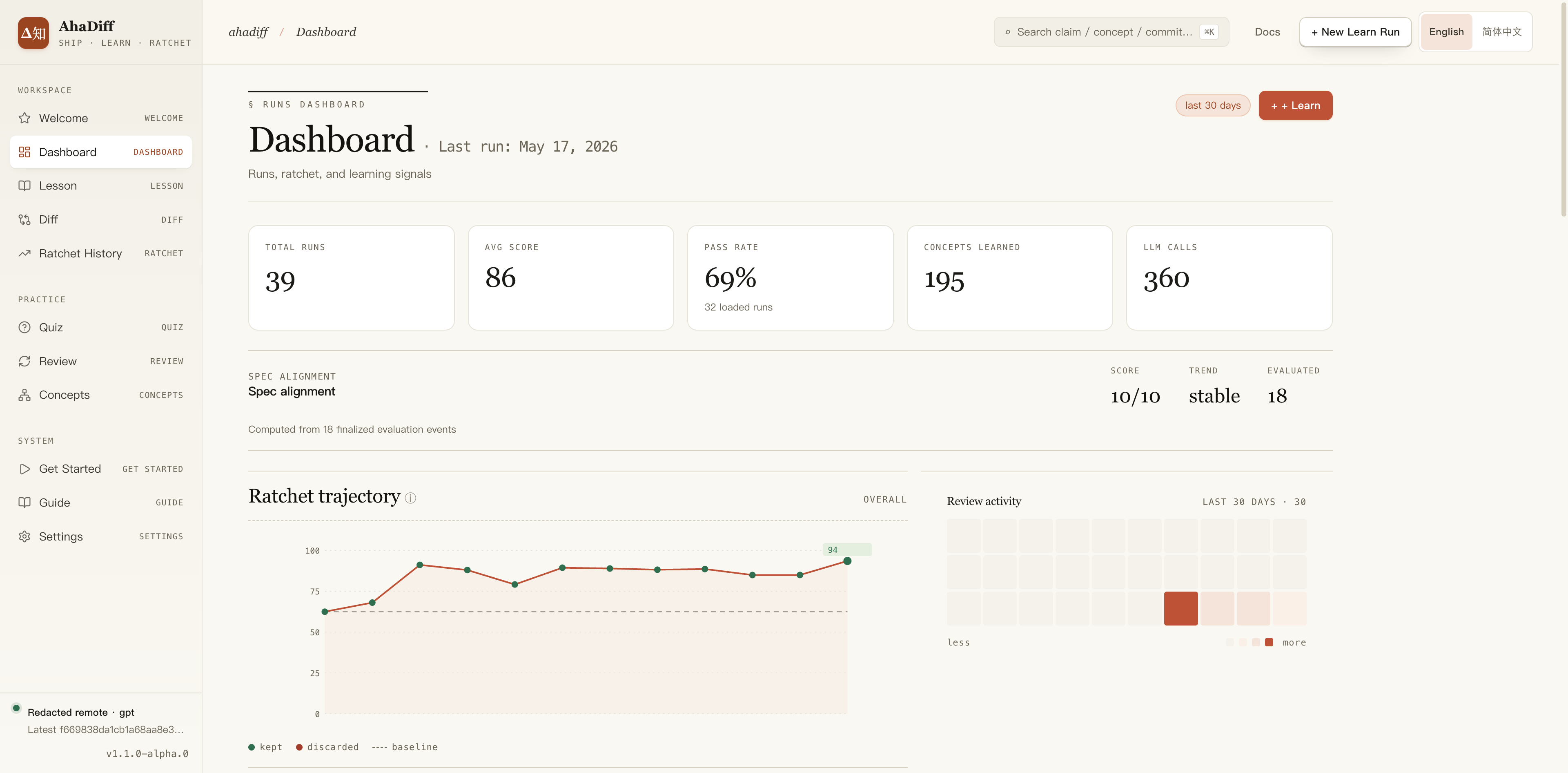
- Top stat cards: total runs, avg score, pass rate, concepts, LLM calls.
- Spec alignment block with score, trend, and evaluated count.
- Ratchet trajectory line chart of kept vs discarded scores.
- Review activity heatmap calendar on the right.
Claims and the diff
Open a claim to inspect its source location and evidence status. The five states below describe what AhaDiff could establish from the captured material.
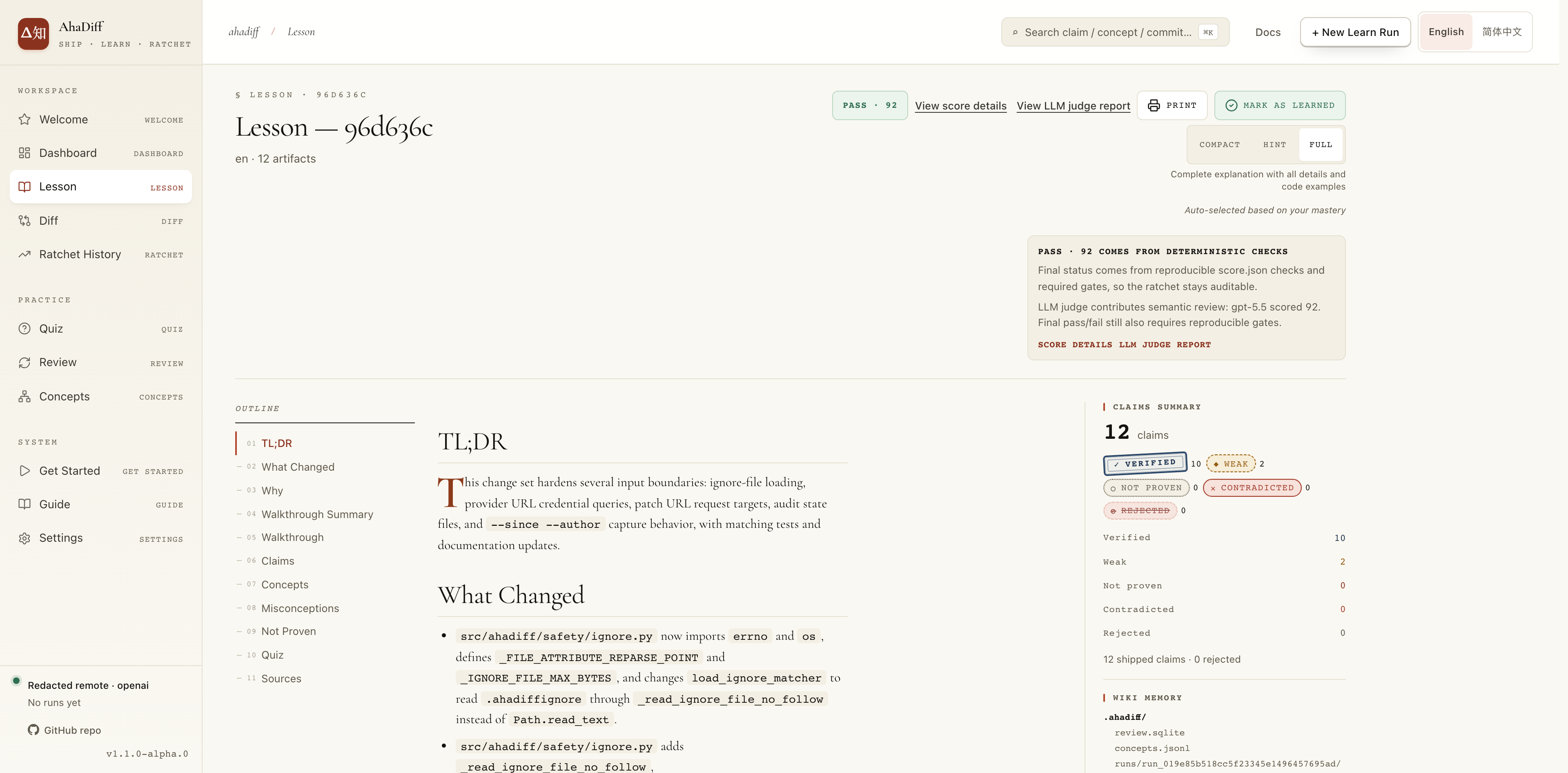
- Header with PASS score, View score details, Mark as Learned.
- Compact / Hint / Full detail-level toggle, top right.
- Left outline rail: TL;DR, What Changed, Claims, Concepts.
- Right claims summary: verified / weak / not proven counts.
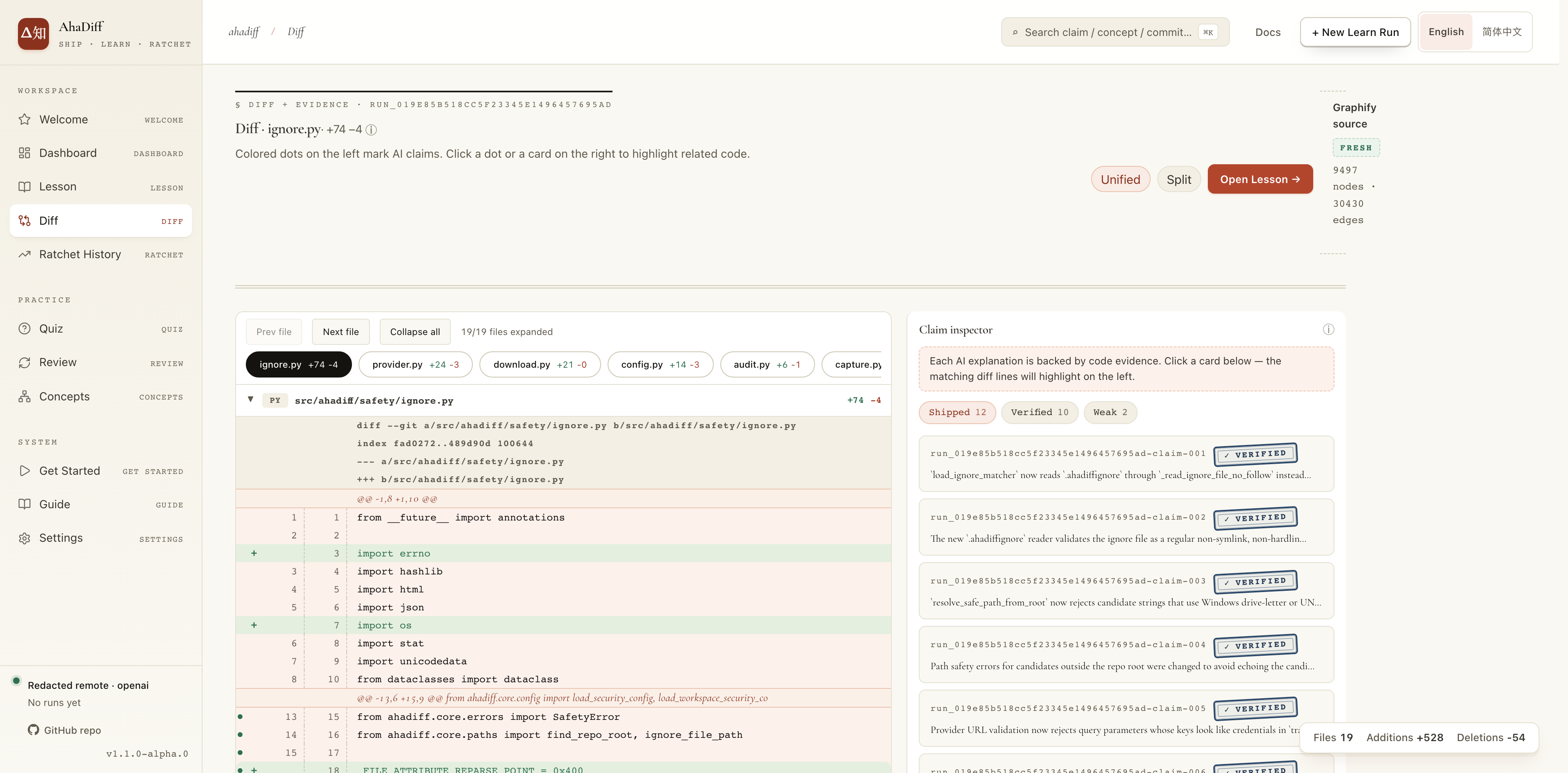
- Center code diff with red/green added and removed lines.
- File tabs and Unified / Split view toggle above the diff.
- Right Claim Inspector panel listing per-claim cards.
- Claim state badges link the explanation back to code lines.
Attempt active transfer practice
Explicitly enable More options for this source → Active transfer practice in the New Run dialog. It is off by default: normal runs keep the mixed guided/recall/transfer allocation. Enabling it requests only open transfer questions; with at least 3 questions, the quiz covers all three exercise forms. Changing the switch invalidates the preview, and changing the source or closing the dialog resets it.
regenerate replaces this run’s quiz and cards, recomputes the score, and clears the old Judge result. It does not rerun the judge. Without a practice flag it keeps the existing mode; --mixed-practice requests a mixed quiz. Select the run you intend to change. Generation uses your configured provider and privacy mode.
Transfer reuses the existing Quiz and SRS flow: Predict the next step, Complete a similar example, or Explain an error. Write your attempt before revealing the reference. Reference answers, explanations, and evidence stay hidden before that attempt; code is never executed.
Compare meaning with the reference, then choose Completed independently, Needed help, or Not yet. When needed, identify the difficulty: recall, application, reasoning, or evidence boundaries. Equivalent wording can be valid. Choice checking is mechanical; open-exercise feedback is semantic self-assessment.
Written WebUI attempts remain in page memory. Only bounded assessment, error-category, and timing metadata are saved. Review brings back the same cards. Delayed recall requires at least 24 hours since the prior recorded attempt; an unseen-variant first attempt requires a question explicitly marked as a new scenario.
Dashboard shows initial practice, delayed recall, and unseen-variant self-assessments with their own sample counts and error categories. A missing denominator is unmeasured, not a zero-success claim. The older SRS rating-improvement ratio remains separate from these practice measures.
Quiz and review
Review grades each card; the grade drives the next due date.
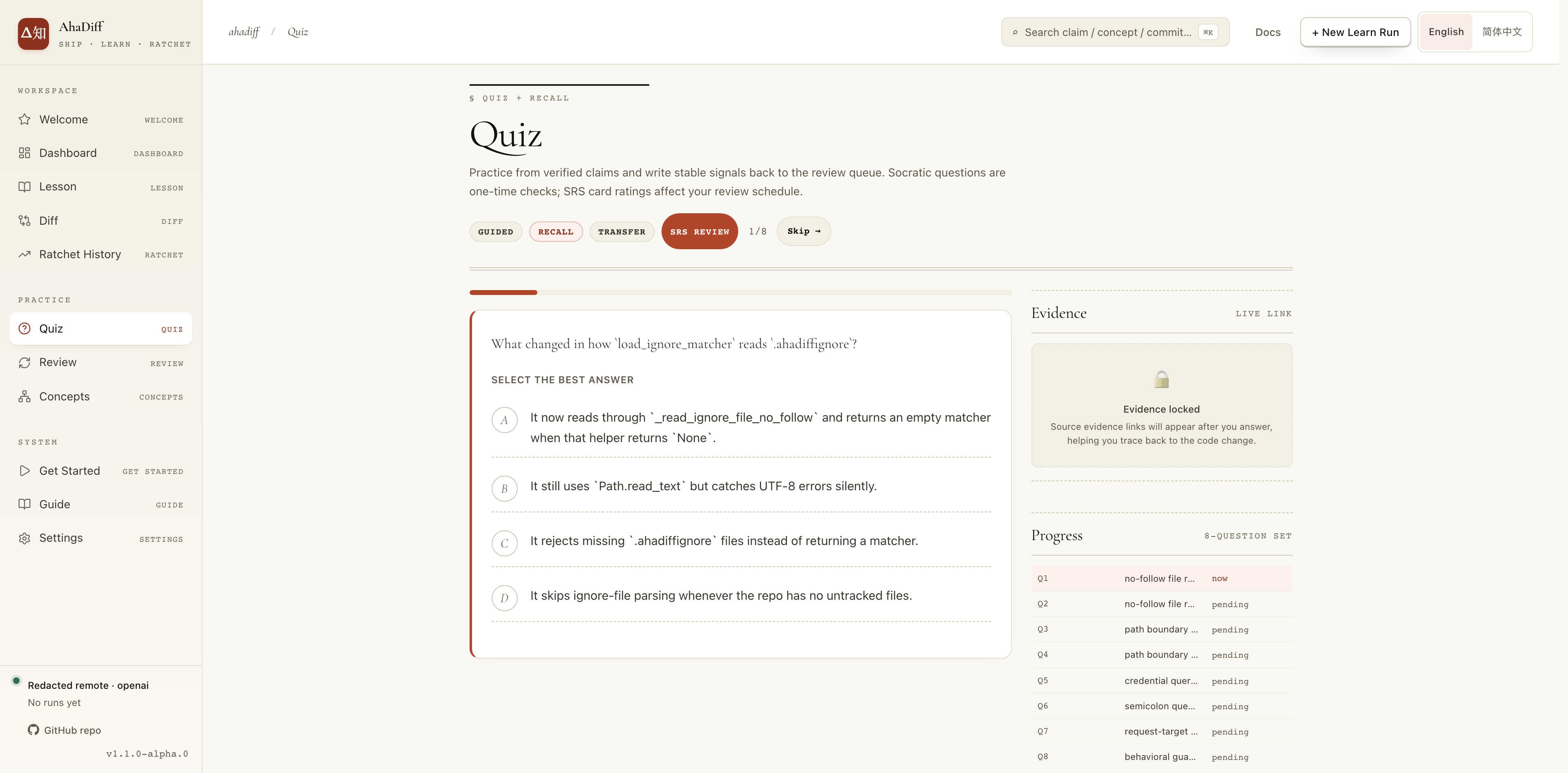
- Single multiple-choice question with A/B/C/D options.
- Guided / Recall / Transfer mode tabs and progress counter.
- Right Evidence panel locked until you answer.
- Right Progress list of per-question status (pending).
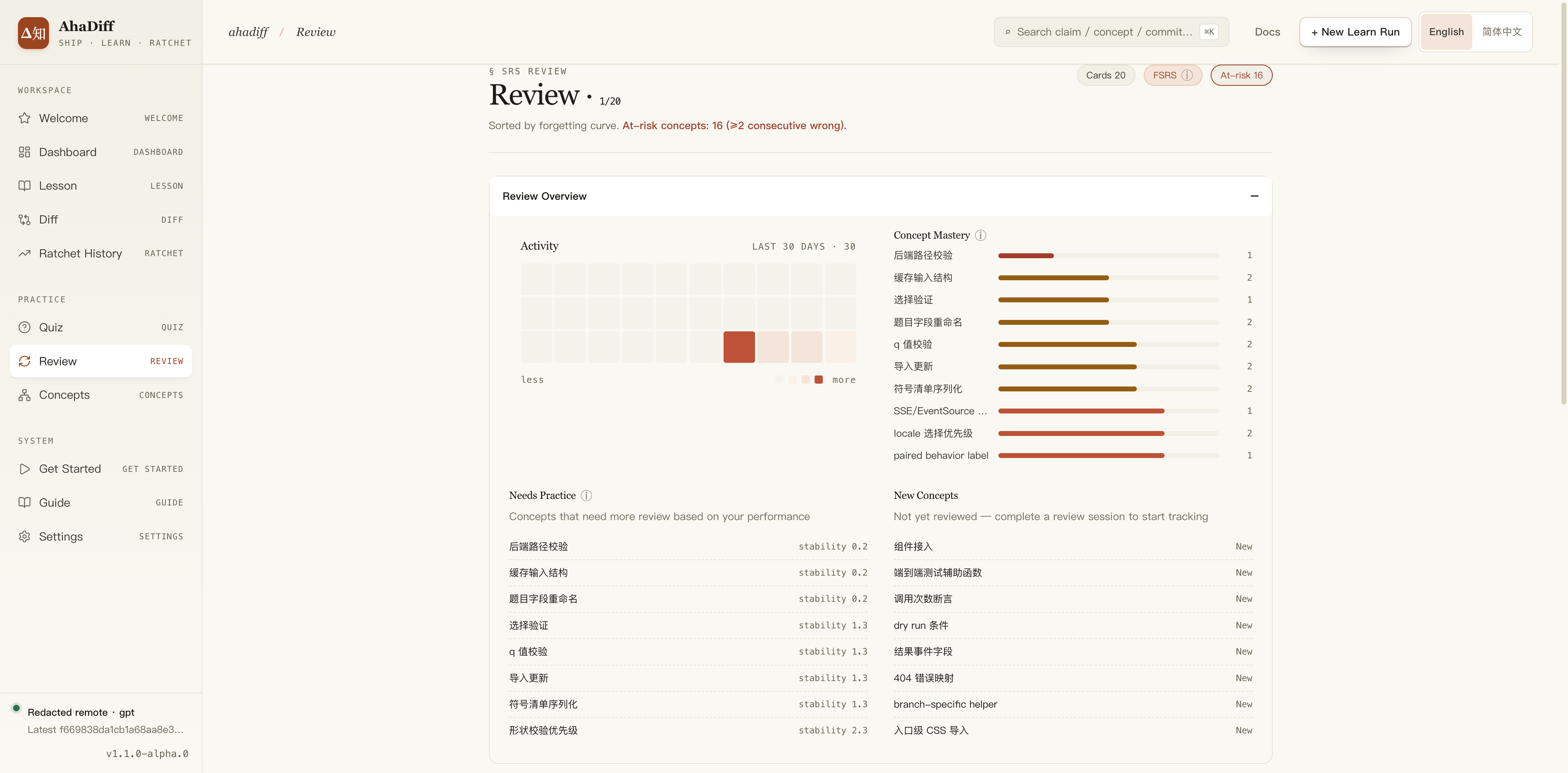
- Header counts: cards due, FSRS, at-risk concepts.
- Review Overview activity heatmap and Concept Mastery list.
- Needs Practice list with per-concept stability values.
- New Concepts list marked New on the right.
Concepts
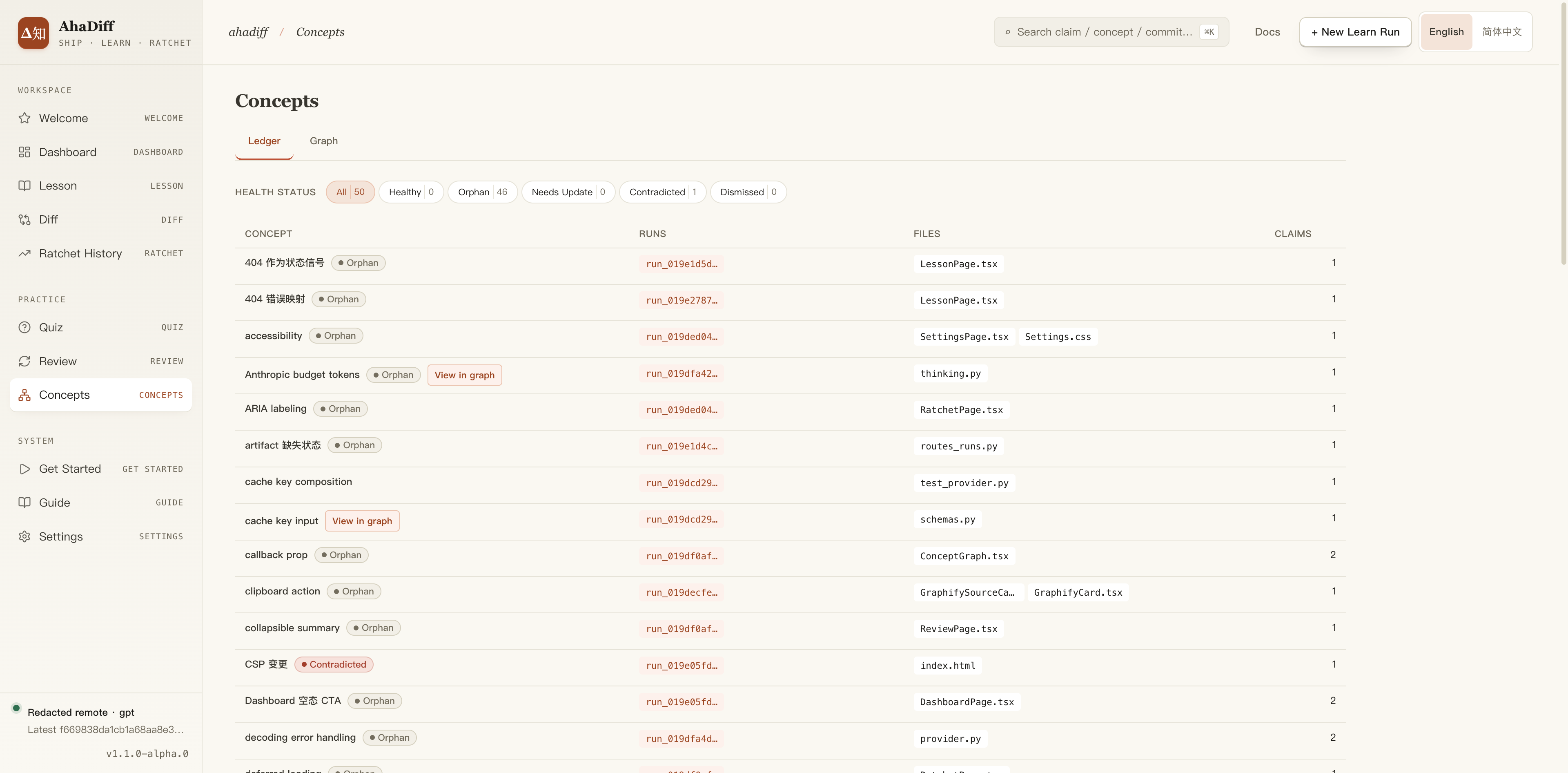
- Ledger / Graph tabs and Health Status filter counts.
- Table columns: concept, runs, files, claims.
- Per-row health tags like Orphan and Contradicted.
- Run and file links per concept row.
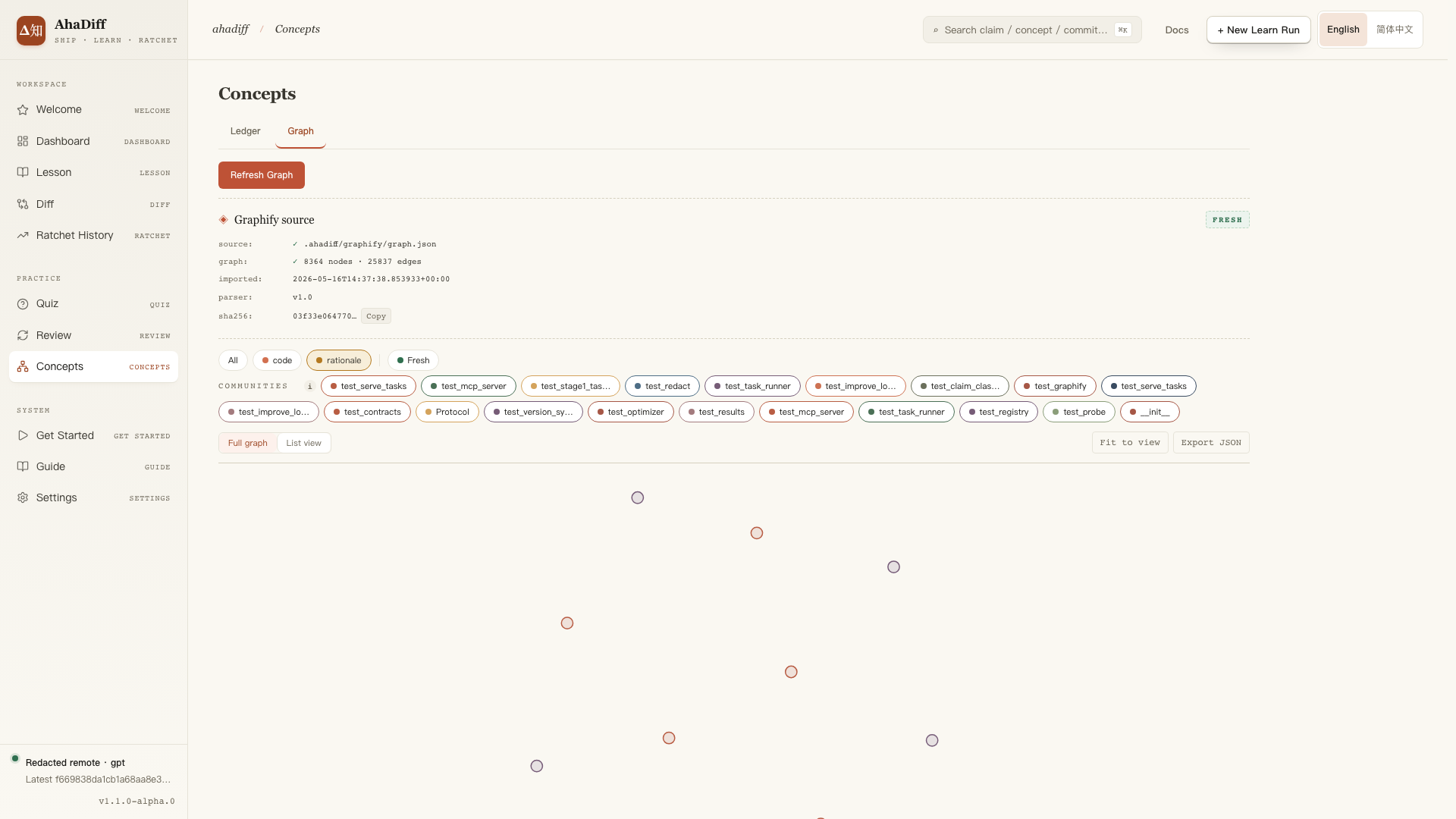
- Ledger / Graph tabs with a Refresh Graph button.
- Graphify source card: node/edge counts, FRESH badge, sha256.
- Community filter chips and All / code / rationale filters.
- Canvas of graph nodes below with Export JSON, Fit to view.
5. Common Commands
Daily work runs through learn, quiz, and review. The clusters below cover everything else: serving the UI and managing local data.
Daily loop
Learn and verify
Generate a run, then check, grade, and improve it.
Serve
Open the local WebUI. --watch adds auto-learn on working-tree changes.
Watch
Auto-learn on working-tree changes. ahadiff serve --watch runs the same watcher with the WebUI attached.
improve-run RUN_ID regenerates a lesson and keeps the new copy only when the deterministic score strictly improves, saving it as a separate run and leaving the original untouched. Use --candidates N (default 3, range 1-10) to control how many regeneration attempts are tried; a higher value improves the chance of beating the score but costs more tokens and time. It works in any install, including pip. The separate improve command tunes AhaDiff's own generation prompts and only runs inside an AhaDiff source checkout.
Maintenance clusters
Database
Run the SQLite integrity gate over review.sqlite.
Graph
Inspect and re-import the Graphify artifact.
Concepts
List, verify, and lint the concept ledger.
Export
Write results to disk for sharing (see Export & Share).
Challenge
Opt-in. Build a challenge from a run, then check state.
MCP
AhaDiff ships a read-only MCP server with 7 tools: runs, run summaries, due cards, search, concepts, stats, and lesson Q&A. Register it once per repo:
Git hooks
ahadiff install hooks adds reminders after a commit and before a push. Add --auto-learn to run ahadiff learn --last in the background after each commit. Check .ahadiff/hooks.log if a run is skipped or fails. Hooks do not block your commit; automatic runs still use the normal privacy, budget, and learnability checks. Rerun the install command with or without the flag to switch modes. Git hooks require macOS/Linux.
Refresh vs learn: what touches Graphify
graph refresh / WebUI refresh
graphify update.learn run
graphify update first when the Graphify CLI is present, then imports.6. Export & Share
The WebUI provides static previews, TSV/JSON results, and Anki cards. From the CLI, use export-results for TSV or export preview for a local preview:
Static preview
A strict-local static bundle with a deterministic zip. Nothing leaves the machine.
TSV
Results as tab-separated values for spreadsheets.
JSON
Results as JSON for scripts and tooling.
Anki .apkg
Active review cards as an Anki deck.
No extra install needed.
Static previews preserve the document/diff source, quoted structural anchors, and separately labeled review notes. Read-only MCP exposes source/anchor provenance and bounded auxiliary excerpts. Preserve those distinctions when sharing or consuming either output. A flattened quotation or a review comment must not become runtime proof. Static preview and APKG files contain answers; share them deliberately after checking their contents.
genanki is bundled.7. Optional Features and Scoring
Choose what each run generates
Quiz count and practice mode
The default quiz has 3 questions. Set a fixed count from 1 to 30 in Settings, or use adaptive mode (default range: 3–12). Active transfer practice requests open questions. With at least 3 questions, it includes prediction, completion, and error-explanation forms.
Capture limits
Auto sizing uses provider information, model limits, and space reserved for the output. Manual mode keeps the limits you set. Inspect any incomplete-capture warning before generating a lesson. Preview display limits and capture limits are separate.
Specification alignment
For a diff run, add --against-spec SPEC.md to compare the change with a local specification. Add --spec-semantic-review for optional model feedback. A standalone document does not use diff-spec alignment.
Challenge
Challenge is off by default. Set enabled = true under [challenge] in the config to enable it. Build an exercise with ahadiff challenge build RUN_ID, then continue in the WebUI. You can study the original solution first, so this is rehearsal of a known example.
Optional tools and automation
- Anki export and file watching are included in the standard package. Automatic learning can make repeated provider requests; review privacy and budget settings before enabling
ahadiff watchorahadiff serve --watchin a Git workspace. - FSRS parameter optimization needs the optional
optimizerextra, which installs torch. Base card review and scheduling work without it. - The repository graph overlay needs a Graphify graph.
ahadiff graph refreshimports an existing graph; it does not run Graphify. - AI tool guidance is optional. Settings previews the exact project files before writing, updating, or removing them. Guide lists the same tools and explains their usage.
Read a run’s score
The deterministic score checks the lesson and its evidence. These are the maximum points for each dimension before excluding dimensions that do not apply:
| Dimension | Maximum | What to check |
|---|---|---|
| Accuracy | 20 | Supported and contradicted claims |
| Evidence | 18 | References to the captured source |
| Diff Coverage | 14 | How much of the visible change has evidence-linked claims |
| Learnability | 14 | The change’s learning content |
| Quiz Transfer | 10 | Questions that apply the lesson |
| Spec Alignment | 10 | The supplied specification |
| Conciseness | 8 | Lesson length and density |
| Safety and Privacy | 6 | Unresolved safety findings |
A run without a specification shows Spec Alignment as N/A. Document runs also show Diff Coverage and change-novelty Learnability as N/A. These dimensions do not lower the overall score; document evidence has its own coverage check.
PASS starts at 80, CAUTION covers 60 to below 80, and FAIL covers scores below 60. A failed required check can still make a high-scoring run FAIL. Open Run Detail → Score to inspect the failed checks and their reasons.
The optional LLM judge adds feedback and cannot override that verdict. If the judge fails, Run Detail shows the failure while retaining the deterministic score. Neither score measures whether you can make a similar change yourself; use your attempts and later recall to assess that.
8. FAQ
Why is there no Lesson / Diff / Quiz?
These pages need a specific run_id. Run ahadiff learn at least once, then open the corresponding run from the Dashboard or from the command's output.
What if the provider fails?
Use the diagnostics in Quick Start and re-test the provider in Settings. The CLI diagnostics below require a Git repository. On Windows PowerShell, set the variables with the $env: form and pass --base-url $env:AHADIFF_PROVIDER_BASE_URL, as shown in Configure a Provider.
Then rerun the matching provider command from Configure a Provider.
What if the lesson gets skipped?
For a small file or patch exercise, enable Generate a lesson even for small changes, or use CLI --force-learn. This bypasses the learnability skip only. Empty changes, unusable evidence, and safety failures still need to be resolved; the switch does not turn them into a pass.
How do I change quiz question count?
Use Settings → Preferences. Fixed mode always asks the configured number of questions, from 1 to 30. Adaptive mode uses the captured diff stats; its default range is 3-12, and old runs without those stats fall back to the fixed count.
How are capture limits chosen?
New repos use auto capture sizing on a priority ladder:
Manual mode keeps the numbers you set in config or Settings. The Settings provider form previews these limits from the unsaved draft, with no remote probe.
Does the LLM judge decide the final verdict?
No. The final verdict comes from deterministic score.json and hard gates. judge.json is advisory; it helps explain model feedback, but it does not override the deterministic verdict. If a dimension is not applicable, such as spec_alignment on a no-spec run, Score and Judge render it as N/A / 0/0.
Why can Accuracy / Evidence gates change?
The base thresholds hold:
Large diffs can use an adaptive threshold from visible files, hunks, and changed lines, with ratio, regime, and basis written to hard_gates.*.policy. This never forgives bad evidence. The run still fails when:
How is Diff Coverage judged?
For diff runs, Diff Coverage uses only the visible files and hunks in the persisted line_map.json:
Omitted files do not enter the denominator. The hunk-count floor keeps tiny hunks counting. The hard gate writes its ratio, regime, and visible basis into the gate detail.
What safety findings fail a run?
An unmitigated Critical safety finding fails the run. A Critical secret finding is treated as mitigated only when the local capture record shows a complete redaction shape, including the rule, hash, source, line, and column.
Can you guarantee there are no bugs?
No. AhaDiff reduces risk by keeping data local, linking lesson claims to diff evidence, and exposing deterministic score and hard-gate details. You should still review generated lessons and run your normal test suite before relying on a change. For release status, use the current GitHub Actions and release notes instead of this static guide.
9. Platforms and Release Information
Core CLI and WebUI target macOS, Linux, and Windows. Python's SQLite runtime must meet the requirement listed in Quick Start. The following features have explicit platform limits.
| Feature | macOS / Linux | Windows |
|---|---|---|
--compare-dir | Available | Unavailable; compare files instead |
hooks | POSIX shell hooks | Unavailable; run learn manually |
| Local key-file protection | Owner-only file permissions | NTFS folder permissions |
See the v1.4.0 release notes for tested platforms, known issues, and downloads. The PyPI package includes the WebUI.
Install from source
A source installation also needs uv and pnpm. Run these commands in a terminal:
Screenshots and videos illustrate the workflow and may show earlier UI details. Use the written steps and labels in this guide for version 1.4.0.