01
Sessions reset too easily
Without long-term memory, every new session starts blank. Preferences, project facts, and earlier decisions all disappear when you switch tools.
Make AI remember with evidence, boundaries, and continuity.
Persistent. Searchable. Auditable.
Memory Palace gives every AI agent a memory that stays put — across sessions, across tools, across teammates. v3.9 makes that memory forget gracefully, retrieve smarter, and refuse silent overwrites. A dashboard, bilingual docs, and one-click Docker are already in the repo.
>read_memory("system://boot")
>search_memory("coding style", include_session=true)
>create_memory("core://agent", ...)
>compact_context(force=false)Memory Palace was built around three things that go wrong every day: forgetting, untrustworthy search, and writes you can't undo.
Without long-term memory, every new session starts blank. Preferences, project facts, and earlier decisions all disappear when you switch tools.
Retrieval quality depends on mode, embeddings, and index health. Memory Palace shows you those knobs and gives you tools to fix them, instead of treating search as a black box.
Memory shouldn't silently duplicate, overwrite, or drift. Every change passes through a guard and leaves a snapshot, so you can always see what happened and roll it back.
Memory is not a feature. It is the substrate that decides whether an agent stays consistent across sessions, tools, and teammates. Memory Palace design principle
The public tool contract already documents a five-stage usage loop. This page compresses it into the practical path most users actually take.
Start with system://boot so the agent gets core memories and recent updates before it starts planning or writing.
Use search_memory and read_memory to find the right node first, instead of guessing paths or duplicating facts.
Create and update operations pass through Write Guard, with duplicate detection, suggested targets, and snapshot-backed rollback boundaries.
Compact long sessions, rebuild indexes when retrieval drifts, and inspect runtime state through the dashboard and maintenance paths.
Six concrete improvements you can feel — already running in the repo, not roadmap promises.
Four background engines keep the memory store healthy: one lets stale memories fade naturally, one builds a layered table-of-contents, one previews what's safe to compress, and one extracts reusable procedures. Nothing gets deleted without your approval.
Forgetting · Layering · Compression · Procedural
Keyword and semantic results are now blended with reciprocal-rank fusion by default on the recommended profiles, so you don't have to pick a mode upfront.
RRF on by default for profiles B / C / D
The native vector engine ships inside SQLite — no Pinecone, no Milvus, no separate process. Falls back gracefully if the optional library isn't installed.
sqlite-vec auto-enabled on profiles C / D
If two agents try to update the same memory at the same time, the second one gets a clear conflict back instead of clobbering the first. You decide what to do.
Optimistic CAS · returns HTTP 409 on stale writes
Every error response is now a clean structured message — no raw stack traces, no internal IDs, no timing leaks on review tokens. Safe to show to users, safe to log.
{ "error", "reason" } shape · timing-safe token compare
Windows, macOS, Linux, and Docker all start the same way. Port already in use? It moves out of the way. Bash and PowerShell scripts behave identically. Containers no longer run as root.
SSE rate-limited · port auto-fallback · .sh + .ps1 paired
Each card describes something the repository already does — clone, start, and it's there.
Every memory is saved to a local file and has a clear path you can read or rename. Aliases let one memory live in multiple places, and a "recently changed" view shows you what moved.
Nine tools cover everything an agent needs. The same set works in Claude Code, Codex, Gemini CLI, OpenCode, and major IDE hosts — no per-client glue.
Writes pass through a guard before they land, and every change gets a snapshot. If something goes wrong, the Review page rolls it back in one click.
Open the Dashboard in your browser and you get four pages: Memory Browser, Review & Rollback, Maintenance, Observability. No separate tool to install.
Four ready-made profiles take you from "tiny local test" to "full hybrid search with a remote embedding API." Change one env file, switch profile, restart — that's it.
Every doc has paired English and Chinese versions, and the Dashboard auto-detects your browser language. v3.9 finished UI translation parity and lets you store memories in CJK characters.
Four background engines watch over the store: they let stale notes fade, build a layered table-of-contents, suggest what's safe to compress, and extract reusable procedures. Nothing is ever deleted without your approval.
The first time you open the Dashboard, a small wizard walks you through entering an API key. If you cloned locally, it can also save common settings straight into your .env.
The public architecture is already documented in the repo. The page below links the main moving parts instead of collapsing them into a generic “AI memory platform” slogan.
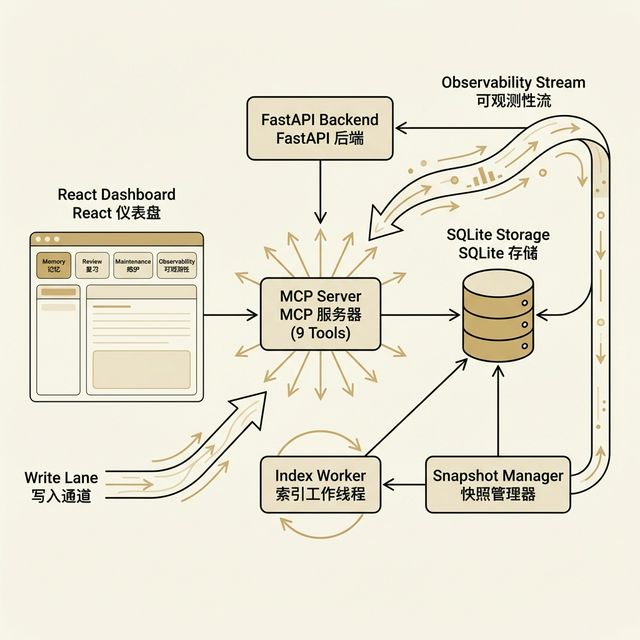
Writes, reads, search, snapshots, and maintenance all live in a single backend service that stores everything in one SQLite file. Vector search runs inside that same file — no extra database to manage.
FastAPI · SQLAlchemy · sqlite-vec
MCP is the shared protocol: Claude Code, Codex, Gemini CLI, OpenCode, Cursor, Windsurf, VSCode and others all talk to Memory Palace using the same nine tools — you set it up once.
The Dashboard is just a web page — open it in any browser. If the backend disconnects, you see a banner. If one view crashes, the error boundary keeps the rest of the UI alive.
React · Vite · TailwindCSS · Framer Motion
If search quality drifts, the Maintenance page shows you the index status and lets you rebuild it. When you change profile or embedding dimension, the index detects the change and reset itself — never a silent downgrade.
The numbers come from real test runs. The "not yet claimed" list keeps us honest about what we haven't verified.
Three ways in: let an agent install it for you, run it yourself in five minutes, or read the tool reference first.
Want the AI to do the setup work? Start with the memory-palace-setup repo — it walks you through everything step by step.
Local dev or Docker — the quick start has bilingual instructions. Stick with Profile B as your first try; it works without any external services.
Integrating a client or doing a safety review? Jump straight to the nine-tool MCP reference and the deployment-profile docs.